

Setting up Talos, Longhorn, and the Kubernetes cluster laid a strong foundation at the OS level for any future work. Now that the OS and low-level work have been handled, the next smart step before running actual services on the Kubernetes cluster would be to:
- Set up a CI/CD system so that edits to resource definitions can be committed to a Git repository and automatically synchronized with the running cluster.
- Create a reverse proxy to balance HTTP ingress traffic among the different services, including the Longhorn UI (which is currently inaccessible).
- Run a monitoring stack to collect metrics on the operation of services.
FluxCD#
Overview#
FluxCD is one of the most popular solutions for versioning Kubernetes resources. To maintain the docker-compose-to-Kubernetes analogy that we used in the previous posts, FluxCD versions and continuously integrates the equivalent of Docker Compose files by uploading them to an OCI registry as if they were standard container images.
Practically, the easiest way to explain how Flux works is to consider a small resource. Suppose that we want to version the following deployment that runs a Grafana service (we will return to this later as well):
---
apiVersion: v1
kind: PersistentVolumeClaim
metadata:
  name: grafana-pvc
spec:
  accessModes:
    - ReadWriteOnce
  resources:
    requests:
      storage: 1Gi
---
apiVersion: apps/v1
kind: Deployment
metadata:
  labels:
    app: grafana
  name: grafana
spec:
  selector:
    matchLabels:
      app: grafana
  template:
    metadata:
      labels:
        app: grafana
    spec:
      securityContext:
        fsGroup: 472
        supplementalGroups:
          - 0
      containers:
        - name: grafana
          image: grafana/grafana:latest
          imagePullPolicy: IfNotPresent
          ports:
            - containerPort: 3000
              name: http-grafana
              protocol: TCP
          readinessProbe:
            failureThreshold: 3
            httpGet:
              path: /robots.txt
              port: 3000
              scheme: HTTP
            initialDelaySeconds: 10
            periodSeconds: 30
            successThreshold: 1
            timeoutSeconds: 2
          livenessProbe:
            failureThreshold: 3
            initialDelaySeconds: 30
            periodSeconds: 10
            successThreshold: 1
            tcpSocket:
              port: 3000
            timeoutSeconds: 1
          resources:
            requests:
              cpu: 250m
              memory: 750Mi
          volumeMounts:
            - mountPath: /var/lib/grafana
              name: grafana-pv
      volumes:
        - name: grafana-pv
          persistentVolumeClaim:
            claimName: grafana-pvc
---
apiVersion: v1
kind: Service
metadata:
  name: grafana
spec:
  ports:
    - port: 3000
      protocol: TCP
      targetPort: http-grafana
  selector:
    app: grafana
  sessionAffinity: None
  type: LoadBalancer
Normally, applying this configuration would require running the kubectl apply command:
kubectl apply -f grafana.yaml --namespace=my-grafanaThis, of course, is a bit suboptimal: every time a change is made to the Git repository, we would ideally prefer to apply the modified resources instantly and without human intervention. The most naive way to implement this would be a small GitHub/Forgejo action that, on every push:
- Configures the credentials to access the Kubernetes cluster.
- Runs the
kubectlcommand to apply the resources.
However, making an action able to fully administer the Kubernetes cluster is not a good idea. Flux comes in precisely to simplify this process. The idea is that this configuration can be versioned as an OCI object in a storage system such as GitHub or Forgejo. On each push, instead of applying the new configuration via kubectl, the action packages the resources in an artifact and pushes them to remote storage:
jobs:
  publish:
    runs-on: ubuntu-latest
    steps:
      - name: Checkout
        uses: https://github.com/actions/checkout@v4

      - name: Set up Flux CLI
        uses: https://github.com/fluxcd/flux2/action@main

      - name: Log in to Forgejo Container Registry
        env:
          FORGEJO_USERNAME: ${{ secrets.PACKAGE_USERNAME }}
          FORGEJO_PACKAGE_TOKEN: ${{ secrets.PACKAGE_TOKEN }}
        run: |
          set -euo pipefail
          printf '%s' "$FORGEJO_PACKAGE_TOKEN" | docker login git.lorecorrias.dev \
            --username "$FORGEJO_USERNAME" \
            --password-stdin

      - name: Push Kubernetes source
        run: |
          set -euo pipefail
          GIT_SHA="$(git rev-parse HEAD)"
          ARTIFACT_TAG="${GIT_SHA:0:12}"
          flux push artifact "${OCI_REPO}:${ARTIFACT_TAG}" \
            --path="./kubernetes" \
            --source="$(git config --get remote.origin.url)" \
            --revision="main@sha1:${GIT_SHA}"

      - name: Promote artifact
        run: |
          set -euo pipefail
          GIT_SHA="$(git rev-parse HEAD)"
          flux tag artifact "${OCI_REPO}:${GIT_SHA:0:12}" --tag latest
Once pushed, the OCI artifact appears in the registry and can be pulled:
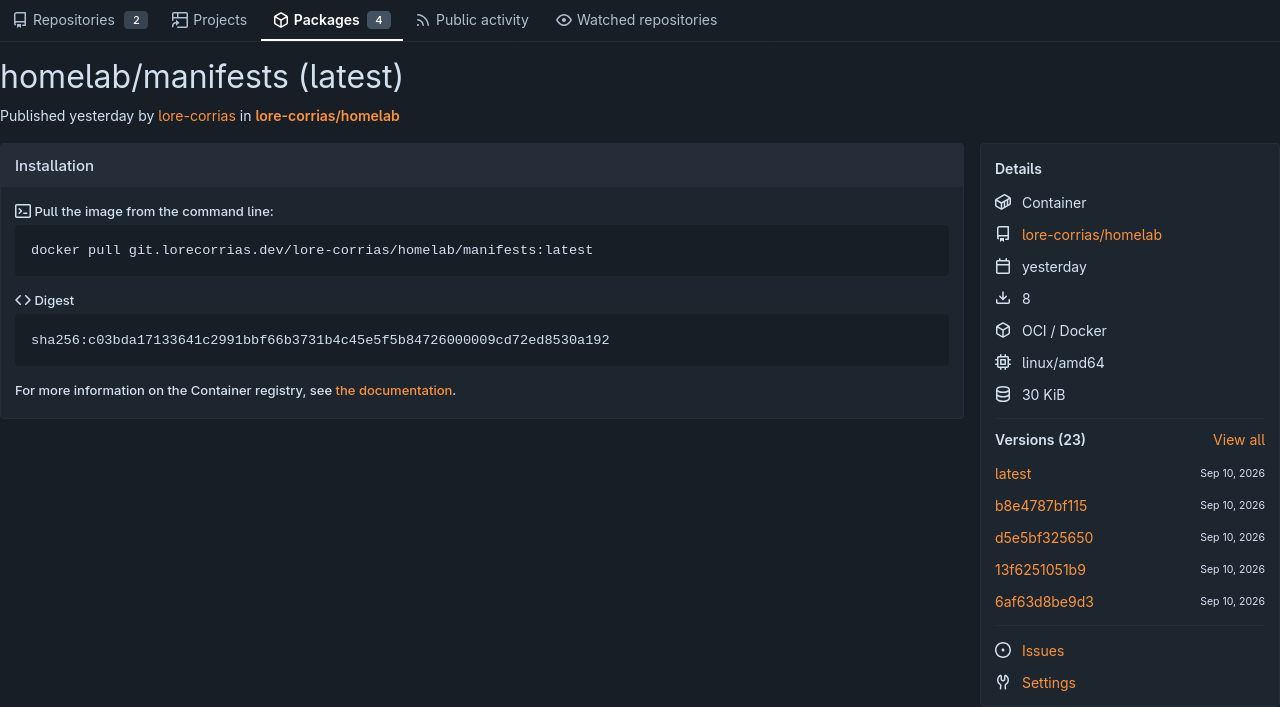
Then, Flux can be configured on the Kubernetes cluster to periodically pull from either a Git repository or an OCI registry and apply the resources from an artifact with a specified name and tag.
Installation#
Installing FluxCD only requires following the installation instructions on the official page. In this case, I chose to install the Flux Operator:
helm install flux-operator oci://ghcr.io/controlplaneio-fluxcd/charts/flux-operator \
  --namespace flux-system \
  --create-namespace
The Flux Operator has a couple of useful features, including a web UI that can be used to track the status of CI/CD syncs and an MCP server.
Once the operator is ready, it is necessary to configure the actual Flux instance, as described in the docs:
apiVersion: fluxcd.controlplane.io/v1
kind: FluxInstance
metadata:
  name: flux
  namespace: flux-system
  annotations:
    fluxcd.controlplane.io/reconcileEvery: "1h"
    fluxcd.controlplane.io/reconcileTimeout: "10m"
spec:
  distribution:
    version: "2.x"
    registry: "ghcr.io/fluxcd"
    artifact: "oci://ghcr.io/controlplaneio-fluxcd/flux-operator-manifests"
  components:
    - source-controller
    - source-watcher
    - kustomize-controller
    - helm-controller
    - notification-controller
    - image-reflector-controller
    - image-automation-controller
  cluster:
    type: kubernetes
    size: medium
    multitenant: false
    networkPolicy: true
    domain: "cluster.local"
  kustomize:
    patches:
      - target:
          kind: Deployment
        patch: |
          - op: replace
            path: /spec/template/spec/nodeSelector
            value:
              kubernetes.io/os: linux
          - op: add
            path: /spec/template/spec/tolerations
            value:
              - key: "CriticalAddonsOnly"
                operator: "Exists"
Then, multiple OCIRepository resources can be used to instruct FluxCD on how to handle continuous integration for different sources. For example, my Kubernetes configurations are stored in an OCI registry in Forgejo, which can be set up as follows:
apiVersion: source.toolkit.fluxcd.io/v1
kind: OCIRepository
metadata:
  name: homelab
  namespace: flux-system
spec:
  interval: 1m
  url: oci://git.lorecorrias.dev/lore-corrias/homelab/manifests
  ref:
    tag: latest
  provider: generic
  secretRef:
    name: oci-auth
To provide authentication to the private registry, I used a Secret resource to configure a Forgejo PAT with sops:
apiVersion: v1
kind: Secret
metadata:
    name: oci-auth
    namespace: flux-system
type: kubernetes.io/dockerconfigjson
stringData:
    .dockerconfigjson: ENC[AES256_GCM,data:aaa....==,type:str]
sops:
    age:
        - enc: |
            -----BEGIN AGE ENCRYPTED FILE-----
            aaa....
            -----END AGE ENCRYPTED FILE-----
          recipient: age1xxxx
    encrypted_regex: ^(data|stringData)$
    lastmodified: "2026-09-06T12:04:04Z"
    mac: ENC[AES256_GCM,data:aaa...=,tag:196kdUVsbsOOsS0wzjErjQ==,type:str]
    version: 3.13.2
Of course, syncing the OCI resources is only one part of the CI process. Specifically, in my case, I used Kustomize to apply all the configuration for the homelab cluster using kubectl apply -k clusters/homelab. FluxCD can be instructed to manage this kind of configuration as well: here, for example, after syncing the OCI registry resources, Flux applies them using Kustomize under the tarball’s ./clusters/homelab directory. This is because of how the Forgejo action is configured, as it builds the package from the kubernetes directory:
apiVersion: kustomize.toolkit.fluxcd.io/v1
kind: Kustomization
metadata:
  name: homelab
  namespace: flux-system
spec:
  interval: 10m
  path: ./clusters/homelab
  prune: true
  sourceRef:
    kind: OCIRepository
    name: homelab
  decryption:
    provider: sops
    secretRef:
      name: sops-age
It’s also necessary to specify that Kustomization may need to decrypt sops files using the sops-age key. To apply all these resources, all that’s missing is a top-level Kustomization file:
apiVersion: kustomize.config.k8s.io/v1beta1
kind: Kustomization
namespace: flux-system

resources:
  - ./flux-instance.yaml
  - ./oci-repository.yaml
  - ./oci-auth.sops.yaml
  - ./cluster-kustomization.yaml
Then, these configurations can be applied via kubectl apply -k kubernetes/clusters/homelab.
Bootstrap#
Now, in a normal setup, the next step would be to bootstrap the Forgejo repository using FluxCD. This is not necessary in this case because we have already managed that part manually: the repository to which Flux would be pointed already exists, contains the GitHub action that builds the OCI artifacts, and Flux is configured to synchronize with them using access provided by a private token. However, if the repository did not already exist, Flux would allow creating it with a simple command:
flux bootstrap gitea \
  --token-auth \
  --owner=my-gitea-username \
  --repository=my-repository-name \
  --branch=main \
  --path=clusters/my-cluster \
  --personal
This creates a private repository using a username and token and uploads the manifests to enable continuous integration. It also stores the PAT for Gitea for future access as a Kubernetes secret.
To test that Flux is working, I will try to deploy Traefik with it and access the Flux administration UI.
Traefik#
I already enjoyed using Traefik to route HTTP traffic for many of my previous Docker-based homelab services. I always found Traefik very nice to use because of its autodiscovery features, which dramatically simplify managing different hostnames because they can be specified alongside the deployment of the services themselves.
This is why I wanted to give it a shot for Kubernetes pods as well. I wanted to deploy Traefik to route all my future services and practice handling CI for my resources.
Installation#
The installation will follow the official Talos guide for installing Traefik as a GatewayClass resource.
Gateway API Overview#
This is a nice guide to deploying Traefik on Kubernetes with the Gateway API. Gateway API is Kubernetes’ new set of resources for managing ingress network traffic, which supersedes the previous Ingress resources. It is more of a role-oriented structure that exposes several CRDs, such as:
GatewayClass: for infrastructure providers that need to manage actual Kubernetes clustersGateway: for cluster operators that need to run reverse proxies likeTraefikHTTP/TCP/TLSRoute: for application developers who need to host their services
It allows for more granular control and better abstractions for different reverse proxies, which can be configured using a unified resource.
Configuration#
To use the Gateway API resources, it is first necessary to install them:
---
# yaml-language-server: $schema=https://www.schemastore.org/kustomization.json
apiVersion: kustomize.config.k8s.io/v1beta1
kind: Kustomization

resources:
  - https://github.com/kubernetes-sigs/gateway-api/releases/download/v1.3.0/standard-install.yaml
  - https://raw.githubusercontent.com/traefik/traefik/v3.5/docs/content/reference/dynamic-configuration/kubernetes-gateway-rbac.yml
  - ./namespace.yaml
  - ./helmrepo-traefik.yaml
  - ./helmrelease-traefik.yaml
Once the resources are applied, the remaining resources create a namespace and install Traefik using Helm:
---
apiVersion: v1
kind: Namespace
metadata:
name: traefik---
# yaml-language-server: $schema=https://datreeio.github.io/CRDs-catalog/source.toolkit.fluxcd.io/helmrepository_v1.json
apiVersion: source.toolkit.fluxcd.io/v1
kind: HelmRepository
metadata:
name: traefik
namespace: flux-system
spec:
interval: 1h
url: https://traefik.github.io/charts---
# yaml-language-server: $schema=https://datreeio.github.io/CRDs-catalog/helm.toolkit.fluxcd.io/helmrelease_v2.json
apiVersion: helm.toolkit.fluxcd.io/v2
kind: HelmRelease
metadata:
name: traefik
namespace: traefik
spec:
interval: 15m
chart:
spec:
chart: traefik
version: "32.x"
sourceRef:
kind: HelmRepository
name: traefik
namespace: flux-system
interval: 15m
install:
createNamespace: true
timeout: 10m
remediation:
retries: 3
upgrade:
timeout: 10m
cleanupOnFail: true
remediation:
retries: 3
strategy: rollback
values:
providers:
kubernetesGateway:
enabled: true
gateway:
enabled: false
gatewayClass:
enabled: true
deployment:
replicas: 1
resources:
requests:
cpu: 100m
memory: 128Mi
limits:
cpu: 500m
memory: 256Mi
ports:
web:
port: 80
exposedPort: 80
protocol: TCP
websecure:
port: 443
exposedPort: 443
protocol: TCP
tls:
enabled: true
service:
type: LoadBalancer
annotations: {}
# Logging configuration
logs:
general:
level: INFO
access:
enabled: true
format: json
# Prometheus metrics
metrics:
prometheus:
entryPoint: metrics
service:
enabled: true
serviceMonitor:
enabled: false
# Node affinity for spreading across nodes
topologySpreadConstraints:
- maxSkew: 1
topologyKey: kubernetes.io/hostname
whenUnsatisfiable: DoNotSchedule
labelSelector:
matchLabels:
app.kubernetes.io/name: traefikThe HelmRelease was partially taken from this guide
The HelmRelease CRD is used to configure the actual Traefik instance, so there are a couple of important points to make:
- The
spec.valuesentries are used to configure Traefik. Specifically:providers.kubernetesGatewayenables Traefik as aGatewayresource to handle trafficgateway/gatewayclass.enabledisables the defaultTraefikgateway and enables theGatewayClasspersistencecreates aPersistentVolumewithLonghornto persist ACME-generated certificatesportsconfigures the entry points for HTTP traffic. Port80will be used for plainHTTPand443forHTTPS- The remaining values are used to create the namespace, upgrade the pod, configure logging and replicas, cap resources, and enable the
Prometheusmetrics endpoint.
---
# yaml-language-server: $schema=https://datreeio.github.io/CRDs-catalog/kustomize.toolkit.fluxcd.io/kustomization_v1.json
apiVersion: kustomize.toolkit.fluxcd.io/v1
kind: Kustomization
metadata:
  name: homelab
  namespace: flux-system
spec:
  interval: 10m
  path: ./clusters/homelab
  prune: true
  sourceRef:
    kind: OCIRepository
    name: homelab
  decryption:
    provider: sops
    secretRef:
      name: sops-age
  # Substitute the base domain for any subdomain
  postBuild:
    substitute:
      BASE_DOMAIN: lorecorrias.dev
Certificates won’t be managed by Traefik; instead, another service named cert-manager will be tasked with registering and distributing them.
TLS Certificates#
Traefik can actually manage TLS certificates by itself, but this has the disadvantage of tying certificate management to the reverse proxy, which might get ugly if, in the future, Traefik is replaced by another proxy. Furthermore, Kubernetes already provides services for managing TLS certificates while respecting pod replication without issues. The most popular service is cert-manager.
Cert-manager allows configuring several CRDs, such as:
ClusterIssuer: which configures a cluster-wide TLS certificate issuer, likeACMECertificate: to generate an actual certificate
The idea is that we will first install cert-manager, then configure ACME as the main certificate issuer to use Cloudflare DNS as a challenge method. Finally, we generate a wildcard certificate for all subdomains to prevent subdomain leaks in the public certificate transparency log.
To install cert-manager, it’s possible to use Helm:
---
apiVersion: v1
kind: Namespace
metadata:
name: cert-manager---
# yaml-language-server: $schema=https://datreeio.github.io/CRDs-catalog/source.toolkit.fluxcd.io/helmrepository_v1.json
apiVersion: source.toolkit.fluxcd.io/v1beta2
kind: HelmRepository
metadata:
name: jetstack-oci
namespace: cert-manager
spec:
type: oci
interval: 1h
url: oci://quay.io/jetstack/charts---
# yaml-language-server: $schema=https://datreeio.github.io/CRDs-catalog/helm.toolkit.fluxcd.io/helmrelease_v2.json
apiVersion: helm.toolkit.fluxcd.io/v2beta2
kind: HelmRelease
metadata:
name: cert-manager
namespace: cert-manager
spec:
interval: 1h
chart:
spec:
chart: cert-manager
version: v1.21.2
sourceRef:
kind: HelmRepository
name: jetstack-oci
interval: 1h
install:
createNamespace: true
values:
crds:
enabled: trueOnce the Helm CRDs have been installed, it’s necessary to set up the ClusterIssuer:
---
apiVersion: cert-manager.io/v1
kind: ClusterIssuer
metadata:
  name: letsencrypt
spec:
  acme:
    email: you@example.com
    server: https://acme-staging-v02.api.letsencrypt.org/directory
    privateKeySecretRef:
      name: letsencrypt-account
    solvers:
      - dns01:
          cloudflare:
            apiTokenSecretRef:
              name: cloudflare-api-token
              key: api-token
In order to hide the actual email, I have encrypted the email entry in the file with sops, because the ClusterIssuer CRD does not allow passing it through a secret. The ACME challenge is configured to use Cloudflare’s DNS, meaning it’s necessary to create a token:
apiVersion: v1
kind: Secret
metadata:
    name: cloudflare-api-token
    namespace: cert-manager
type: Opaque
stringData:
    api-token: ...
Finally, we create a wildcard certificate for all subdomains:
---
apiVersion: cert-manager.io/v1
kind: Certificate
metadata:
  name: wildcard
  namespace: default
spec:
  secretName: wildcard-tls

  issuerRef:
    name: letsencrypt
    kind: ClusterIssuer

  dnsNames:
    - "${BASE_DOMAIN}"
    - "*.${BASE_DOMAIN}"
    - "*.chall.${BASE_DOMAIN}"
In order to apply this configuration, it’s first necessary to apply the CRDs:
---
# yaml-language-server: $schema=https://www.schemastore.org/kustomization.json
apiVersion: kustomize.config.k8s.io/v1beta1
kind: Kustomization

resources:
  - ./helmrelease-certmanager.yaml
  - ./helmrepo-certmanager.yaml
  - ./namespace.yaml
  # - ./wildcard-certificate.yaml
  # - ./cloudflare-api-token.sops.yaml
  # - ./cluster-issuer.sops.yaml
Then, uncomment the remaining resources and apply them.
Whoami Service#
Now that the Traefik configuration is dealt with, it’s necessary to set up the Gateway resource, which will allocate port 80 for HTTP traffic:
---
apiVersion: gateway.networking.k8s.io/v1
kind: Gateway
metadata:
  name: traefik-gateway
  namespace: default
spec:
  gatewayClassName: traefik
  listeners:
    - name: web
      protocol: HTTP
      port: 80
      allowedRoutes:
        namespaces:
          from: Same

    - name: websecure
      protocol: HTTPS
      port: 443
      hostname: "*.${BASE_DOMAIN}"

      tls:
        mode: Terminate
        certificateRefs:
          - group: ""
            kind: Secret
            name: wildcard-tls

      allowedRoutes:
        namespaces:
          from: Same
Then, to double-check that everything has been configured correctly, we can try to spin up a dummy service named whoami:
---
apiVersion: apps/v1
kind: Deployment
metadata:
  name: whoami
  namespace: default
spec:
  selector:
    matchLabels:
      app: whoami
  template:
    metadata:
      labels:
        app: whoami
    spec:
      containers:
        - name: whoami
          image: traefik/whoami
---
apiVersion: v1
kind: Service
metadata:
  name: whoami
  namespace: default
spec:
  selector:
    app: whoami
  ports:
    - port: 80
      targetPort: 80
And, to actually receive traffic via the configured Gateway, it’s necessary to specify an HTTPRoute resource:
---
apiVersion: gateway.networking.k8s.io/v1
kind: HTTPRoute
metadata:
  name: whoami-http
  namespace: default
spec:
  parentRefs:
    - name: traefik-gateway
      sectionName: web
  hostnames:
    - whoami.${BASE_DOMAIN}
  rules:
    - filters:
        - type: RequestRedirect
          requestRedirect:
            scheme: https
            statusCode: 301
---
apiVersion: gateway.networking.k8s.io/v1
kind: HTTPRoute
metadata:
  name: whoami-https
  namespace: default
spec:
  parentRefs:
    - name: traefik-gateway
      sectionName: websecure
  hostnames:
    - whoami.${BASE_DOMAIN}
  rules:
    - matches:
        - path:
            type: PathPrefix
            value: /
      backendRefs:
        - name: whoami
          port: 80
Here, plain HTTP traffic is redirected to the HTTPS port.
The final Kustomization file thus looks like this:
---
# yaml-language-server: $schema=https://www.schemastore.org/kustomization.json
apiVersion: kustomize.config.k8s.io/v1beta1
kind: Kustomization

resources:
  - https://github.com/kubernetes-sigs/gateway-api/releases/download/v1.3.0/standard-install.yaml
  - https://raw.githubusercontent.com/traefik/traefik/v3.5/docs/content/reference/dynamic-configuration/kubernetes-gateway-rbac.yml
  - ./namespace.yaml
  - ./helmrepo-traefik.yaml
  - ./helmrelease-traefik.yaml
  - ./traefik-gateway.yaml
  - ./whoami
  - ./tailscale-sidecar
  - ./cert-manager
After pushing to Git, Flux will reconcile the remote repository with the desired state. We can force this operation to make it quicker (the Flux resource must be reconciled manually):
root@homelab-dc /workspace/kubernetes main*
venv  ❯ kubectl apply -f clusters/homelab/flux-system/cluster-kustomization.yaml
kustomization.kustomize.toolkit.fluxcd.io/homelab unchanged

root@homelab-dc /workspace/kubernetes main*
venv  ❯ flux reconcile kustomization homelab --with-source
► annotating OCIRepository homelab in flux-system namespace
✔ OCIRepository annotated
◎ waiting for OCIRepository reconciliation
✔ fetched revision latest@sha256:5fe6ddaeed2e63de3fa381886f93d2f0e4054b1754d16157e55f4603467b7d25
► annotating Kustomization homelab in flux-system namespace
✔ Kustomization annotated
◎ waiting for Kustomization reconciliation
✔ applied revision latest@sha256:5fe6ddaeed2e63de3fa381886f93d2f0e4054b1754d16157e55f4603467b7d25

root@homelab-dc /workspace/kubernetes main* 8s
venv  ❯ curl -i \
       --resolve whoami.lorecorrias.dev:80:192.168.10.254 \
       http://whoami.lorecorrias.dev/
HTTP/1.1 200 OK
Content-Length: 428
Content-Type: text/plain; charset=utf-8
Date: Sat, 12 Sep 2026 22:02:13 GMT

Hostname: whoami-7fd8895794-j9k9b
IP: 127.0.0.1
IP: ::1
IP: 10.244.5.86
IP: fe80::e018:f3ff:fe7e:68cd
RemoteAddr: 10.244.5.87:47286
GET / HTTP/1.1
Host: whoami.lorecorrias.dev
User-Agent: curl/8.14.1
Accept: */*
Accept-Encoding: gzip
X-Forwarded-For: 10.244.5.1
X-Forwarded-Host: whoami.lorecorrias.dev
X-Forwarded-Port: 80
X-Forwarded-Proto: http
X-Forwarded-Server: traefik-697f4b54c5-4hsvj
X-Real-Ip: 10.244.5.1
Connecting it to Tailscale#
As you may have seen from the previous test, the Traefik service we exposed is only reachable from the local network. Since all Kubernetes services should be reachable only from the local Tailnet (for now), the easiest solution is to make Traefik reachable as a Tailscale client using a sidecar container. Sidecar containers allow Traefik to share the Tailscale network with another container and route traffic accordingly.
To set up the sidecar container, it’s sufficient to:
- Create a secret with the pre-authentication key.
- Assign the container a custom tag, such as
k8s-ingress.
One addition not mentioned in the docs is creating a PersistentVolume to make sure that the container does not have to re-authenticate after every disruption or recreation. The final resources look like this:
---
# yaml-language-server: $schema=https://www.schemastore.org/kustomization.json
apiVersion: kustomize.config.k8s.io/v1beta1
kind: Kustomization

resources:
  - ./state-pvc.yaml
- ./auth.sops.yamlapiVersion: v1
kind: PersistentVolumeClaim
metadata:
name: traefik-tailscale-state
namespace: traefik
spec:
accessModes:
- ReadWriteOnce
storageClassName: longhorn
resources:
requests:
storage: 128MiapiVersion: v1
kind: Secret
metadata:
name: traefik-tailscale-auth
namespace: traefik
type: Opaque
stringData:
authkey: hskey-auth-...---
# yaml-language-server: $schema=https://datreeio.github.io/CRDs-catalog/helm.toolkit.fluxcd.io/helmrelease_v2.json
apiVersion: helm.toolkit.fluxcd.io/v2
kind: HelmRelease
metadata:
name: traefik
namespace: traefik
spec:
interval: 15m
chart:
spec:
chart: traefik
version: "32.x"
sourceRef:
kind: HelmRepository
name: traefik
namespace: flux-system
interval: 15m
install:
createNamespace: true
timeout: 10m
remediation:
retries: 3
upgrade:
timeout: 10m
cleanupOnFail: true
remediation:
retries: 3
strategy: rollback
values:
providers:
kubernetesGateway:
enabled: true
gateway:
enabled: false
gatewayClass:
enabled: true
deployment:
replicas: 1
additionalVolumes:
- name: tailscale-state
persistentVolumeClaim:
claimName: traefik-tailscale-state
additionalContainers:
- name: tailscale
image: ghcr.io/tailscale/tailscale:latest
securityContext:
privileged: true
runAsUser: 0
runAsGroup: 0
runAsNonRoot: false
env:
- name: TS_AUTHKEY
valueFrom:
secretKeyRef:
name: traefik-tailscale-auth
key: authkey
- name: TS_AUTH_ONCE
value: "true"
- name: TS_ACCEPT_DNS
value: "false"
- name: TS_HOSTNAME
value: "traefik"
- name: TS_KUBE_SECRET
value: ""
- name: TS_STATE_DIR
value: /var/lib/tailscale
- name: TS_USERSPACE
value: "false"
- name: TS_ENABLE_METRICS
value: "true"
- name: TS_EXTRA_ARGS
value: >-
--login-server=https://vpn.${BASE_DOMAIN}
volumeMounts:
- name: tailscale-state
mountPath: /var/lib/tailscale
ports:
- name: ts-metrics
containerPort: 9002
protocol: TCP
updateStrategy:
type: Recreate
resources:
requests:
cpu: 100m
memory: 128Mi
limits:
cpu: 500m
memory: 256Mi
ports:
web:
port: 80
exposedPort: 80
protocol: TCP
websecure:
port: 443
exposedPort: 443
protocol: TCP
tls:
enabled: true
service:
type: LoadBalancer
annotations: {}
# Logging configuration
logs:
general:
level: INFO
access:
enabled: true
format: json
# Prometheus metrics
metrics:
prometheus:
entryPoint: metrics
service:
enabled: true
serviceMonitor:
enabled: false
# Node affinity for spreading across nodes
topologySpreadConstraints:
- maxSkew: 1
topologyKey: kubernetes.io/hostname
whenUnsatisfiable: DoNotSchedule
labelSelector:
matchLabels:
app.kubernetes.io/name: traefikA Real Use Case: Flux Operator’s UI#
To demonstrate how an actual routing rule for a real service is written, I created a resource that routes traffic from flux.${BASE_DOMAIN} to Flux Operator’s UI. I will consider the simplest case, which deploys the UI in read-only mode without the need to configure SSO or authentication.
The main issue when routing traffic is understanding where to place the newly created route. This decision must be consistent with the allowedRoutes.namespaces.from setting of Traefik’s Gateway. This option specifies how routes should be segmented per namespace: the default option, Same, allows defining routes only inside the same namespace as the Gateway resource. This means that, for example, if I had to route traffic to the Flux namespace, I’d need to set up the route inside default and add an additional resource named ReferenceGrant to authorize routing to the Flux service:
---
apiVersion: gateway.networking.k8s.io/v1beta1
kind: ReferenceGrant
metadata:
  name: allow-flux-web-route
  namespace: flux-system
spec:
  from:
    - group: gateway.networking.k8s.io
      kind: HTTPRoute
      namespace: default
  to:
    - group: ""
      kind: Service
      name: flux-operator
The advantage of this option is that multiple people with different permissions can work on the same cluster without necessarily empowering every user to create arbitrary routes, which might not be desirable. Since I am the only administrator of the cluster, it makes more sense to use a selector policy to manually opt in namespaces that can create routes for the Gateway under default:
---
apiVersion: gateway.networking.k8s.io/v1
kind: Gateway
metadata:
  name: traefik-gateway
  namespace: default
spec:
  gatewayClassName: traefik
  listeners:
    - name: web
      protocol: HTTP
      port: 80
      allowedRoutes:
        namespaces:
          from: Selector
          selector:
            matchExpressions:
              - key: kubernetes.io/metadata.name
                operator: In
                values: &allowed_namespaces
                  - default
                  - flux-system

    - name: websecure
      protocol: HTTPS
      port: 443
      hostname: "*.${BASE_DOMAIN}"

      tls:
        mode: Terminate
        certificateRefs:
          - group: ""
            kind: Secret
            name: wildcard-tls

      allowedRoutes:
        namespaces:
          from: Selector
          selector:
            matchExpressions:
              - key: kubernetes.io/metadata.name
                operator: In
                values: *allowed_namespaces
This only requires maintaining a list of namespaces that can claim routes for the default Gateway, which is the same for HTTP and HTTPS traffic.
Since the namespace flux-system is now allowed, it’s possible to add an HTTP route for the web UI. I will redirect all HTTP traffic to HTTPS and route requests to the backend at port 9080:
---
apiVersion: gateway.networking.k8s.io/v1
kind: HTTPRoute
metadata:
  name: flux-http
  namespace: flux-system
spec:
  parentRefs:
    - name: traefik-gateway
      namespace: default
      sectionName: web
  hostnames:
    - flux.${BASE_DOMAIN}
  rules:
    - filters:
        - type: RequestRedirect
          requestRedirect:
            scheme: https
            statusCode: 301
---
apiVersion: gateway.networking.k8s.io/v1
kind: HTTPRoute
metadata:
  name: flux-https
  namespace: flux-system
spec:
  parentRefs:
    - name: traefik-gateway
      namespace: default
      sectionName: websecure
  hostnames:
    - flux.${BASE_DOMAIN}
  rules:
    - matches:
        - path:
            type: PathPrefix
            value: /
      backendRefs:
        - name: flux-operator
          port: 9080
Once the Flux state has been reconciled, it should be possible to reach the UI:
root@homelab-dc /workspace main*
venv  ❯ curl https://flux.${BASE_DOMAIN} -vI
* Host flux.${BASE_DOMAIN}:443 was resolved.
* IPv6: (none)
* IPv4: 100.64.0.4
*   Trying 100.64.0.4:443...
* ALPN: curl offers h2,http/1.1
* TLSv1.3 (OUT), TLS handshake, Client hello (1):
*  CAfile: /etc/ssl/certs/ca-certificates.crt
*  CApath: /etc/ssl/certs
* TLSv1.3 (IN), TLS handshake, Server hello (2):
* TLSv1.3 (IN), TLS change cipher, Change cipher spec (1):
* TLSv1.3 (IN), TLS handshake, Encrypted Extensions (8):
* TLSv1.3 (IN), TLS handshake, Certificate (11):
* TLSv1.3 (IN), TLS handshake, CERT verify (15):
* TLSv1.3 (IN), TLS handshake, Finished (20):
* TLSv1.3 (OUT), TLS change cipher, Change cipher spec (1):
* TLSv1.3 (OUT), TLS handshake, Finished (20):
* SSL connection using TLSv1.3 / TLS_AES_128_GCM_SHA256 / x25519 / RSASSA-PSS
* ALPN: server accepted h2
* Server certificate:
*  subject: CN=${BASE_DOMAIN}
*  start date: Sep 14 17:27:19 2026 GMT
*  expire date: Dec 13 17:27:18 2026 GMT
*  subjectAltName: host "flux.${BASE_DOMAIN}" matched cert's "*.${BASE_DOMAIN}"
*  issuer: C=US; O=Let's Encrypt; CN=YR2
*  SSL certificate verify ok.
*   Certificate level 0: Public key type RSA (2048/112 Bits/secBits), signed using sha256WithRSAEncryption
*   Certificate level 1: Public key type RSA (2048/112 Bits/secBits), signed using sha256WithRSAEncryption
*   Certificate level 2: Public key type RSA (4096/152 Bits/secBits), signed using sha256WithRSAEncryption
*   Certificate level 3: Public key type RSA (4096/152 Bits/secBits), signed using sha256WithRSAEncryption
* Connected to flux.${BASE_DOMAIN} (100.64.0.4) port 443
* using HTTP/2
* [HTTP/2] [1] OPENED stream for https://flux.${BASE_DOMAIN}/
* [HTTP/2] [1] [:method: HEAD]
* [HTTP/2] [1] [:scheme: https]
* [HTTP/2] [1] [:authority: flux.${BASE_DOMAIN}]
* [HTTP/2] [1] [:path: /]
* [HTTP/2] [1] [user-agent: curl/8.14.1]
* [HTTP/2] [1] [accept: */*]
> HEAD / HTTP/2
> Host: flux.${BASE_DOMAIN}
> User-Agent: curl/8.14.1
> Accept: */*
>
* TLSv1.3 (IN), TLS handshake, Newsession Ticket (4):
* Request completely sent off
< HTTP/2 200
HTTP/2 200
< accept-ranges: bytes
accept-ranges: bytes
< cache-control: no-cache, no-store, must-revalidate
cache-control: no-cache, no-store, must-revalidate
< content-type: text/html; charset=utf-8
content-type: text/html; charset=utf-8
< date: Tue, 15 Sep 2026 09:57:41 GMT
date: Tue, 15 Sep 2026 09:57:41 GMT
< permissions-policy: geolocation=(), microphone=(), camera=()
permissions-policy: geolocation=(), microphone=(), camera=()
< referrer-policy: strict-origin-when-cross-origin
referrer-policy: strict-origin-when-cross-origin
< x-frame-options: DENY
x-frame-options: DENY
< x-robots-tag: noindex, nofollow
x-robots-tag: noindex, nofollow
< x-xss-protection: 1; mode=block
x-xss-protection: 1; mode=block
< content-length: 1523
content-length: 1523
<

* Connection #0 to host flux.${BASE_DOMAIN} left intact
Creating a Webhook for FluxCD Reconciliations#
In order to speed up the reconciliation phase of FluxCD, it’s possible to set up an HTTP webhook to manually trigger the deployment process. The idea is that Flux exposes a URL via an HTTPRoute resource and the Forgejo action makes an authenticated POST request to it to schedule a deployment.
The authentication phase of the Forgejo action will be performed via Forgejo’s OIDC: the action passes a Forgejo-supplied token to validate that the request comes from:
- A Forgejo action
- A Forgejo action from a specific repository
- A Forgejo action that was triggered by a push to the repository
Create Webhook Receiver#
FluxCD’s docs explain that this can be done by configuring a Receiver resource:
---
apiVersion: notification.toolkit.fluxcd.io/v1
kind: Receiver
metadata:
  name: homelab-artifact
  namespace: flux-system
spec:
  type: generic-oidc
  oidcProviders:
    - issuerURL: https://git.lorecorrias.dev/api/actions
      audience: flux-homelab-receiver
      validations:
        - expression: "claims.sub == 'repo:lore-corrias/homelab:ref:refs/heads/main'"
          message: "must be the homelab main branch"
        - expression: "claims.workflow_ref == 'lore-corrias/homelab/.forgejo/workflows/flux-ci.yml@refs/heads/main'"
          message: "wrong workflow"
        - expression: "claims.event_name == 'push'"
          message: "must be a push workflow"
  resources:
    - apiVersion: source.toolkit.fluxcd.io/v1
      kind: OCIRepository
      name: homelab
      namespace: flux-system
And the next step is to create the actual HTTPRoute to receive requests:
---
apiVersion: gateway.networking.k8s.io/v1
kind: HTTPRoute
metadata:
  name: webhook-receiver-http
  namespace: flux-system
spec:
  parentRefs:
    - name: traefik-gateway
      namespace: default
      sectionName: web
  hostnames:
    - flux-receiver.${BASE_DOMAIN}
  rules:
    - filters:
        - type: RequestRedirect
          requestRedirect:
            scheme: https
            statusCode: 301
---
apiVersion: gateway.networking.k8s.io/v1
kind: HTTPRoute
metadata:
  name: webhook-receiver-https
  namespace: flux-system
spec:
  parentRefs:
    - name: traefik-gateway
      namespace: default
      sectionName: websecure
  hostnames:
    - flux-receiver.${BASE_DOMAIN}
  rules:
    - matches:
        - path:
            type: PathPrefix
            value: /
      backendRefs:
        - name: webhook-receiver
          namespace: flux-system
port: 80---
apiVersion: kustomize.config.k8s.io/v1beta1
kind: Kustomization
namespace: flux-system
resources:
- ./receiver.yaml
- ./httproute-receiver.yamlOnce Flux reconciles the application of this receiver, the path to be called by the Forgejo action can be retrieved using the command:
kubectl -n flux-system get receiver homelab-artifact -o jsonpath='{.status.webhookPath}{"\n"}'Connect the Forgejo Action#
In order to actually call the webhook, it’s necessary to add an additional step in Flux’s CI action to POST to the hook’s URL:
jobs:
  publish:
    runs-on: ubuntu-latest
    enable-openid-connect: true
    steps:
      # ...

      - name: Promote artifact
        run: |
          set -euo pipefail
          GIT_SHA="$(git rev-parse HEAD)"
          flux tag artifact "${OCI_REPO}:${GIT_SHA:0:12}" --tag latest

      - name: Trigger Flux reconciliation
        env:
          FLUX_RECEIVER_AUDIENCE: flux-homelab-receiver
          FLUX_RECEIVER_URL: ${{ vars.FLUX_RECEIVER_URL }}
        run: |
          set -euo pipefail

          response="$(
            curl --fail --silent --show-error \
              -H "Authorization: bearer ${ACTIONS_ID_TOKEN_REQUEST_TOKEN}" \
              "${ACTIONS_ID_TOKEN_REQUEST_URL}&audience=${FLUX_RECEIVER_AUDIENCE}"
          )"
          id_token="$(jq --exit-status --raw-output '.value' <<<"${response}")"

          curl --fail --silent --show-error \
            --request POST \
            -H "Authorization: Bearer ${id_token}" \
            "${FLUX_RECEIVER_URL}"
Where FLUX_RECEIVER_URL is formed as https://{FLUX_RECEIVER_DOMAIN}/{FLUX_RECEIVER_HOOK_PATH}.
This action will generate a Forgejo OIDC token to validate the action’s identity. The only missing step is connecting the Forgejo action to Tailscale:
jobs:
  publish:
    runs-on: ubuntu-latest
    enable-openid-connect: true
    steps:
      # ...

      - name: Promote artifact
        # ...

      - name: Connect to Headscale
        uses: https://github.com/tailscale/github-action@v4
        with:
          authkey: ${{ secrets.HEADSCALE_CI_AUTHKEY }}
          use-cache: "false"
          args: >-
            --login-server=https://vpn.lorecorrias.dev
            --accept-dns=true
          ping: 100.64.0.4

      - name: Trigger Flux reconciliation
        env:
          FLUX_RECEIVER_AUDIENCE: flux-homelab-receiver
          FLUX_RECEIVER_URL: ${{ vars.FLUX_RECEIVER_URL }}
        run: |
            # ...
For Headscale, I decided to add a github-ci custom tag and allow devices with that tag to connect to caddy and traefik, the Kubernetes ingress:
{
    "tagOwners": {
        // Traefik accepts Tailnet traffic for Kubernetes services.
        "tag:k8s-ingress": ["group:admin"],

        // ...

        // Tailscale Forgejo Actions CI ephemeral devices
        "tag:github-ci": ["group:admin"],
    },

    "acls": [
        // Tailnet members and GitHub Actions access Kubernetes services through Traefik directly.
        {
            "action": "accept",
            "src": ["autogroup:member","tag:github-ci"],
            "proto": "tcp",
            "dst": [
                "tag:k8s-ingress:80",
                "tag:k8s-ingress:443",
            ],
        },

        // Allow CI containers to reach Caddy
        {
            "action": "accept",
            "src": ["tag:github-ci"],
            "proto": "tcp",
            "dst": [
                "caddy:443",
            ],
        }
    ]
}
One additional tweak I needed was to add the NET_ADMIN capability and the /dev/net/tun device to allow Tailscale connections.
This is actually starting to make the Forgejo action configuration a pretty insecure component, both in terms of ACLs and capabilities, so it would be wise to tighten permissions in the future.
{
  pkgs,
  config,
  homelabTopology,
  ...
}:

let
  forgejo = homelabTopology.services.forgejo;
in
{
  services.gitea-actions-runner = {
    package = pkgs.forgejo-runner;

    instances.default = {
      enable = true;
      name = "lancelot-runner";
      url = "https://${forgejo.subdomain}.${homelabTopology.site.base_domain}";
      # The path to the runner token file may differ.
      # tokenFile should use the format TOKEN=<secret> because it is an EnvironmentFile for systemd.
      tokenFile = config.sops.secrets."forgejo-runner".path;
      labels = [
        "ubuntu-latest:docker://ghcr.io/catthehacker/ubuntu:runner-latest@sha256:f5b91ec4002735fe75d46a6c4b998c932f7528f57c538ad5d9548975d77d15c8"
        "ubuntu-24.04:docker://ghcr.io/catthehacker/ubuntu:runner-24.04@sha256:e6161fe254c75d470433c91f51b178c305d456e4b582faae158e303963c4ce42"
        # Optionally provide native execution on the host:
        # "native:host"
      ];
      settings = {
        container = {
          # Mount the host Docker socket in every action job. This allows
          # Buildx to use host Docker without requiring Docker-in-Docker.
          docker_host = "unix:///var/run/docker.sock";
          options = "--group-add 131 --cap-add=NET_ADMIN --device=/dev/net/tun";
        };
      };
    };
  };
}
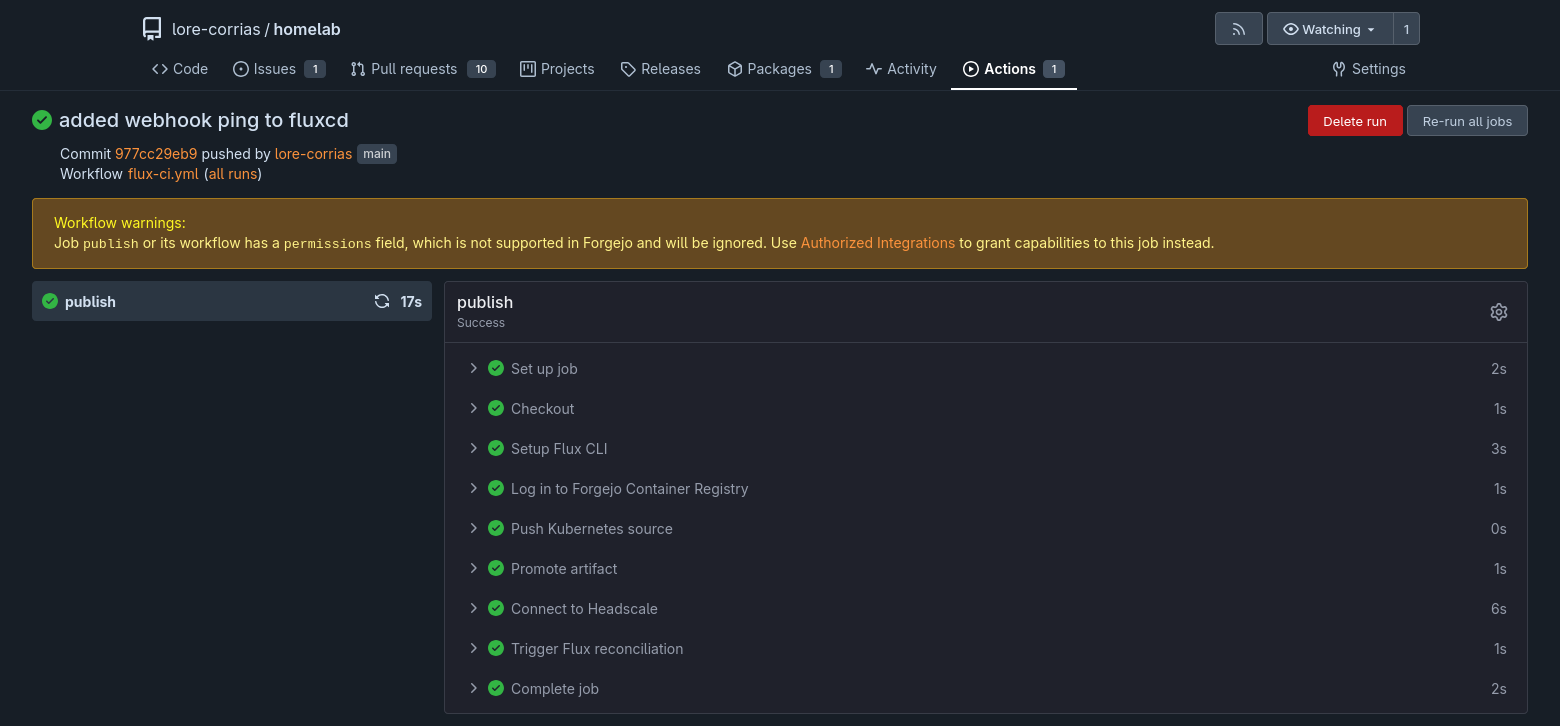
Now, every time the Flux action runs, the remote state is reconciled almost immediately:
Wrapping Up#
The setup of Flux and Traefik, particularly in some areas, could actually be hardened, and that might be the point of a future post. In the next one, however, I will try to create a monitoring dashboard both for Kubernetes and, if possible, for the whole lab. Until then, thanks for following!